
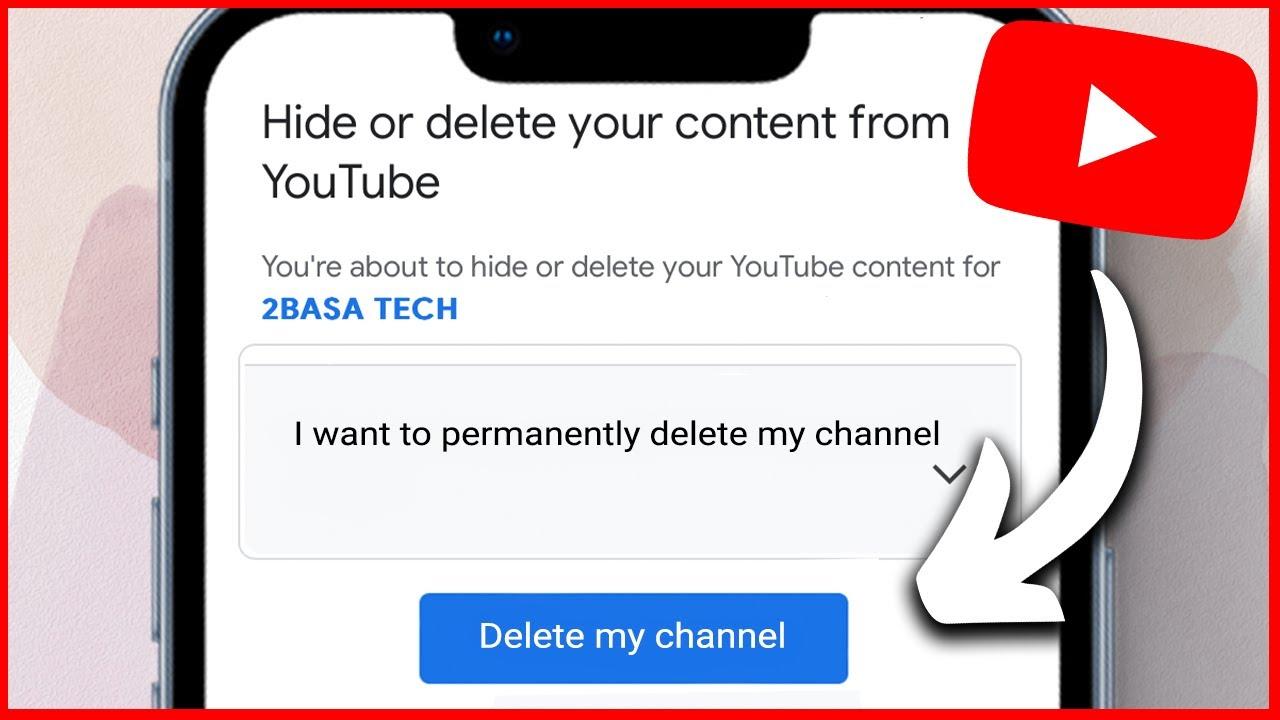
Thinking about saying goodbye to your YouTube channel? Whether you’re feeling overwhelmed by the constant pressure of content creation, or simply ready to close that chapter of your online journey, deleting your YouTube channel can be as liberating as shedding an old skin. But before you hit that delete button, it’s important to understand the steps involved and the implications of that decision. Don’t worry; it’s not as daunting as it may seem! In this guide, we’ll walk you through the process step by step, ensuring you’re fully prepared to bid farewell to your channel and all those memories without any regrets. So, let’s dive in and get your channel deletion journey underway!
Understanding Your Motivation for Deleting Your YouTube Channel
When you’re contemplating a big decision like wiping your YouTube channel off the face of the internet, it’s crucial to dig deep and understand what’s driving that urge. Maybe you’re feeling overwhelmed by the constant demands of content creation or perhaps the pressure to continuously grow your audience is just too much. It could even be that you’ve lost the passion that once fueled those late-night editing sessions. Whatever the reason, understanding your motivation can pave the way for smoother waters ahead. Remember, it’s perfectly fine to step back if that’s what you need, and sometimes, saying goodbye is just as important as the journey itself.
Take a moment to jot down the thoughts swirling around in your head. Consider these key points:
- Time Commitment: Are you finding it hard to balance your channel with other life responsibilities?
- Creative Drought: Have you hit a wall in coming up with fresh ideas?
- Engagement Levels: Is the audience interaction not what you had hoped?
- Shifting Interests: Have you discovered new passions that are pulling you away?
By clarifying your motivations, you’ll gain not just closure but also a better perspective on the next steps in your creative journey. Whether you choose to delete your channel or take a well-deserved break, embracing your reasons can empower your decision.
Preparing for a Clean Break: Backing Up Your Content
Before you hit the delete button on your YouTube channel, take a moment to back up your content. Think of it like packing a suitcase before a trip—you wouldn’t want to leave anything important behind! To make sure your videos, comments, and other essential data are safe and sound, follow these simple steps:
- Download Your Videos: Go to YouTube Studio, select the videos you want, and download them directly. It’s a straightforward process that keeps your content intact.
- Export Your Comments: Use tools like Google Takeout to grab all those comments you’ve gathered over the years. They’re part of your YouTube legacy!
- Save Your Thumbnails: Don’t forget those eye-catching thumbnails. They’re like the cover of a good book, critical for grabbing attention.
Once you have everything safely backed up, consolidate your files in a folder on your computer. The last thing you want is to be scrambling through your downloads when you need to find a specific clip. Consider creating a simple table to keep track of what you’ve saved:
| Content Type | Status |
|---|---|
| Videos | ✔️ Downloaded |
| Comments | ✔️ Exported |
| Thumbnails | ✔️ Saved |
Once you have this organized, you’ll be ready for your clean break, knowing that all your hard work is securely tucked away! Don’t rush the process; this is an important step to ensure you have memories to look back on.

Navigating the Deletion Process Without a Hitch
When it’s time to let go of your YouTube channel, the whole process can feel a bit daunting, but it doesn’t have to be! Start by ensuring you’ve backed up any videos or data you want to keep—think of it as gathering your belongings before moving out of an apartment. You wouldn’t leave behind all your cherished memories, right? Once you’ve done that, log into your account, head over to the “Settings,” and look for the “Advanced Settings” section. This is like that behind-the-scenes door where the magic happens!
Now, here comes the vital part—carefully read through the options before confirming the deletion. It’s like making sure you have everything packed before you shut the door to your old life. You’ll be presented with a list of important information regarding what will disappear, and it’s essential to digest that. If you’re sure about your decision, click that delete option and embrace your fresh start! Just remember, once it’s gone, it’s gone, like a summer sunset, beautiful but fleeting. Double-check your choice; you don’t want to mistakenly wave goodbye to something that meant a lot to you.
What Happens Next? Embracing Life Beyond YouTube
As you hit that button to delete your YouTube channel, it might feel like you’re stepping off a rollercoaster ride, a mix of exhilaration and a bit of fear. What comes next? You’re entering a new chapter, one where you can explore the vast landscape of opportunities that await you beyond the screen. Think of it like shedding an old skin—liberating, isn’t it? Suddenly, you have time to delve into hobbies you’ve sidelined, invest time in creating genuine relationships, or even launch a different project that’s been simmering in the back of your mind. The world is your oyster; you just need to dive in and start shucking!
It’s important to take stock of what really makes you tick. Here are a few steps to consider as you navigate this transition:
- Reconnect with old passions – Remember that love for painting or hiking? Dust it off!
- Explore new skills – Ever wanted to learn how to code or bake the perfect soufflé? Now’s your chance.
- Network and meet new people – Attend local meet-ups, workshops, or online courses; connections are invaluable.
- Reflect on your journey – Journal about your experiences; it’s therapeutic and enlightening.
With this fresh start, embrace the journey ahead—like a blank canvas, you get to decide what masterpiece you create next!
Closing Remarks
And there you have it! Deleting your YouTube channel doesn’t have to be a herculean task full of confusion and frustration. With these straightforward steps, you can say goodbye to your channel with just a few clicks—like flipping the pages of a book you’ve finished reading. Whether you’re making space for new adventures or simply ready to close this chapter of your digital life, it’s entirely your call. Remember, it’s all part of the journey, and every end paves the way for new beginnings.
If you’ve got any lingering questions or just want to chat about your experience, drop your thoughts in the comments below! And hey, don’t forget to share this guide with anyone else who might be in the same boat. Until next time, take care of yourself out there in the wild web of the internet!