

Ever find yourself wanting to kick back with friends for movie night, but you’re all scattered across different couch cushions in separate homes? Enter Teleparty, your virtual wingman for synchronized watching. Imagine diving into your favorite YouTube videos together, sharing laughs and reactions, all while feeling like you’re in the same room. It’s like the modern-day equivalent of passing popcorn, but without the greasy fingers! In this guide, we’ll explore how to sync up your screens and chill with Teleparty, creating the perfect setup for some serious binge-watching magic. So, grab your snacks, settle in, and let’s make those virtual hangouts feel just a little bit cozier!
Getting Started with Teleparty and YouTube for a Virtual Hangout Experience
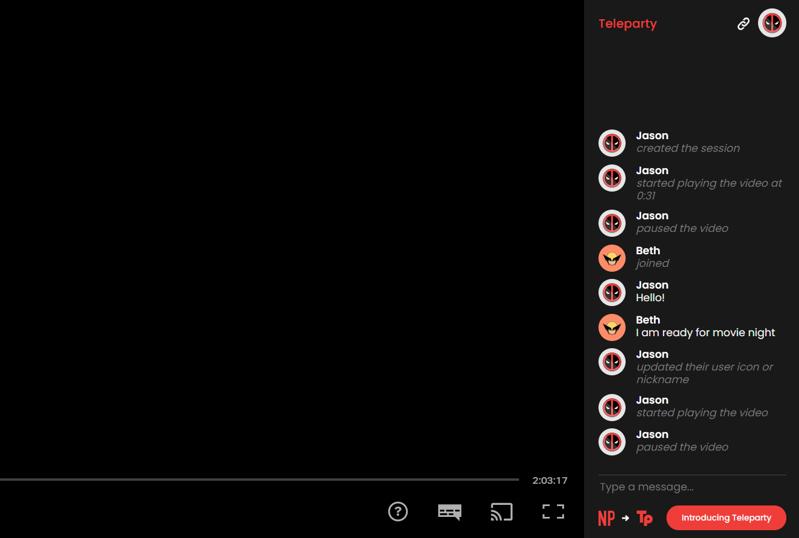
Setting up Teleparty to enjoy a YouTube marathon with friends is as easy as pie! First, you’ll want to make sure you have the Teleparty extension installed on your browser. It’s like putting on your favorite comfy socks before lounging on the couch. Once that’s done, head over to YouTube, find the video you want to watch, and hit that pause button. Now, let your friends in on the fun by sharing the Teleparty link generated upon starting the session. This will sync everyone up, so it feels like you’re all together, even if you’re miles apart!
Now that you’re all set to binge-watch, consider spicing things up with a *virtual snack bar*. Here’s a quick list of ideas to keep the Munchies Monster at bay while you enjoy your digital hangout:
- Popcorn: A classic choice; you can’t go wrong!
- Fruit platters: Fresh, colorful, and guilt-free.
- Dips and chips: Perfect for sharing and dipping in between laugh breaks.
And hey, remember to keep the chat rolling in the sidebar. It’s not just about the video; it’s about sharing reactions and inside jokes that make you all feel connected. So, grab your snacks, hit play, and let the good vibes roll!
Setting Up Your Teleparty: A Step-by-Step Guide to Seamless Streaming
Ready to jump in and get your Teleparty going? First things first, make sure you’ve got the right setup. Start by installing the Teleparty extension on your browser; it’s usually just a couple of clicks away in the Chrome Web Store. Once that’s done, grab your friends and share the love! Open YouTube and pick a video you want to watch together. Click on the Teleparty extension icon in your browser, and just like that, you’ll see a ‘Start the Party’ button. Create a room and share the link with your pals. Everyone simply clicks on the link, and boom—everyone’s in sync! It’s like magic, but way more fun than pulling a rabbit out of a hat.
Now, let’s talk about the fun features you’ll love! During your viewing session, everyone can hit pause or play, and the control is shared. Talk about teamwork! There’s also a live chat feature, perfect for sharing those classic commentary moments or inside jokes. But hey, to enhance the experience even more, consider setting the Auto Play option, so you never have to sit through those awkward breaks between episodes. Here’s a quick rundown on what you and your friends can do:
| Feature | Description |
|---|---|
| Chat Feature | Engage in real-time conversations. |
| Pause/Play Controls | Let everyone in the room control the playback. |
| Auto Play | Skip awkward breaks automatically. |
Making It Fun: Tips for Curating the Perfect Watch Party Playlist

Curating the perfect playlist for your watch party is like mixing a great cocktail. You want to balance the sweet, the sour, and a little kick to keep things lively! Start by considering the vibe of the show or movie you’re watching. If it’s a nail-biting thriller, throw in some pulse-pounding tracks that crank up the tension. For a light-hearted rom-com, think about adding tunes that put everyone in a flirty, fun mood. Involve your guests in the process—ask for their favorite songs or memorable movie soundtracks. It’s a great way to break the ice and get everyone hyped up!
Don’t forget to switch it up as the party goes on! A good playlist can flow like a story, so include a mix of genres and tempos. Here are some tips to keep it engaging:
- Start with familiarity: Kick things off with popular tracks everyone knows and loves.
- Mix in some surprises: Throw in a wildcard song that could spark a lively conversation.
- Consider the timeline: Align specific songs with pivotal moments in the show—build excitement before the big reveal!
| Mood | Suggested Songs |
|---|---|
| Thrilling | “Welcome to the Jungle” - Guns N’ Roses |
| Romantic | “Can’t Help Falling in Love” – Elvis Presley |
| Feel-good | “Happy” – Pharrell Williams |
| Reflective | “Someone Like You” - Adele |
Interactive Features to Enhance Your Viewing Experience and Keep the Vibes Going

Imagine chilling on your couch with friends, snacks in hand, ready to dive into a movie night without the hassle of setting up multiple screens. With the power of Teleparty, you can create an experience that feels like everyone is right there with you, even if they’re continents apart. The real magic happens when you explore its interactive features! You can chat in real-time, react with fun emojis, and even pause the movie for spontaneous discussions. Picture this: you’re halfway through a thriller, and someone has a wild theory about the killer. Instead of waiting until the end, you can pause and hash it out right then and there, making every viewing the ultimate social experience.
But that’s not all! Teleparty also allows you to customize your virtual hangout. How about throwing in a poll for your next flick? Should we go with the latest rom-com or revisit that classic horror? Everyone can vote right from their screens, preserving that collective excitement. Plus, you can keep the vibes going between flicks with the built-in chat function that lets you share memes, movie recommendations, or just random banter. It’s like passing notes in class but without the sneaky glances from the teacher. So gather your friends, hit play, and let Teleparty transform your ordinary movie night into an unforgettable event!
Wrapping Up
So, there you have it—syncing up with friends and family through Teleparty on YouTube is a total game-changer. Imagine being able to laugh at the same jokes, ogle the same epic fails, or even hold your breath through nail-biting moments, all together, no matter where you are. It’s like bringing the movie theater experience right into your living room, minus the overpriced popcorn.
Next time you want to catch up with your pals or just hang out while enjoying some quality entertainment, fire up Teleparty. Set the scene, grab your favorite snacks, and dive into that binge-worthy series or fun movie. Trust me, it turns lonely screen time into shared memories that you’ll treasure long after the credits roll.
So go ahead—hit that play button, sync up, and let the good times roll! Happy watching!