You know that feeling when you open your YouTube and you’re greeted by a chaotic list of past searches? It’s like stepping into a room crammed with old junk—awkward, isn’t it? Clearing that clutter can not only streamline your viewing experience but also pave the way for fresh recommendations that actually spark joy. Let’s chat about how to wipe the slate clean, effortlessly delete your search history, and boost your YouTube experience like a breeze. Imagine diving into a pool of content that truly reflects your current interests instead of what you stumbled upon months ago. Ready to tidy things up? Let’s get started!
Understanding the Why Behind Clearing Your YouTube Search History
When you dive into the world of YouTube, it’s easy to lose track of what you’ve searched for or watched. Clearing your search history isn’t just about tidying up; it can actually enhance your overall experience. Have you ever noticed how recommendations get wacky? By purging those old search queries, you’re giving YouTube a fresh start to tailor suggestions that genuinely resonate with your interests. Plus, it helps maintain your privacy. You wouldn’t want someone stumbling upon your obsession with cat videos or late-night conspiracy theories, right?
Think of it like cleaning out your closet. Over time, it fills up with items you no longer wear or use, making it tougher to find that one outfit you love. Similarly, cluttered search history can obscure the gems you actually enjoy. Here are a few benefits of regularly clearing out your YouTube search history:
- Improved Personalization: New, relevant recommendations.
- Enhanced Privacy: Keeps your viewing habits discreet.
- Easier Navigation: Less clutter means a smoother experience.

A Step-by-Step Guide to Deleting Your Search Footprint
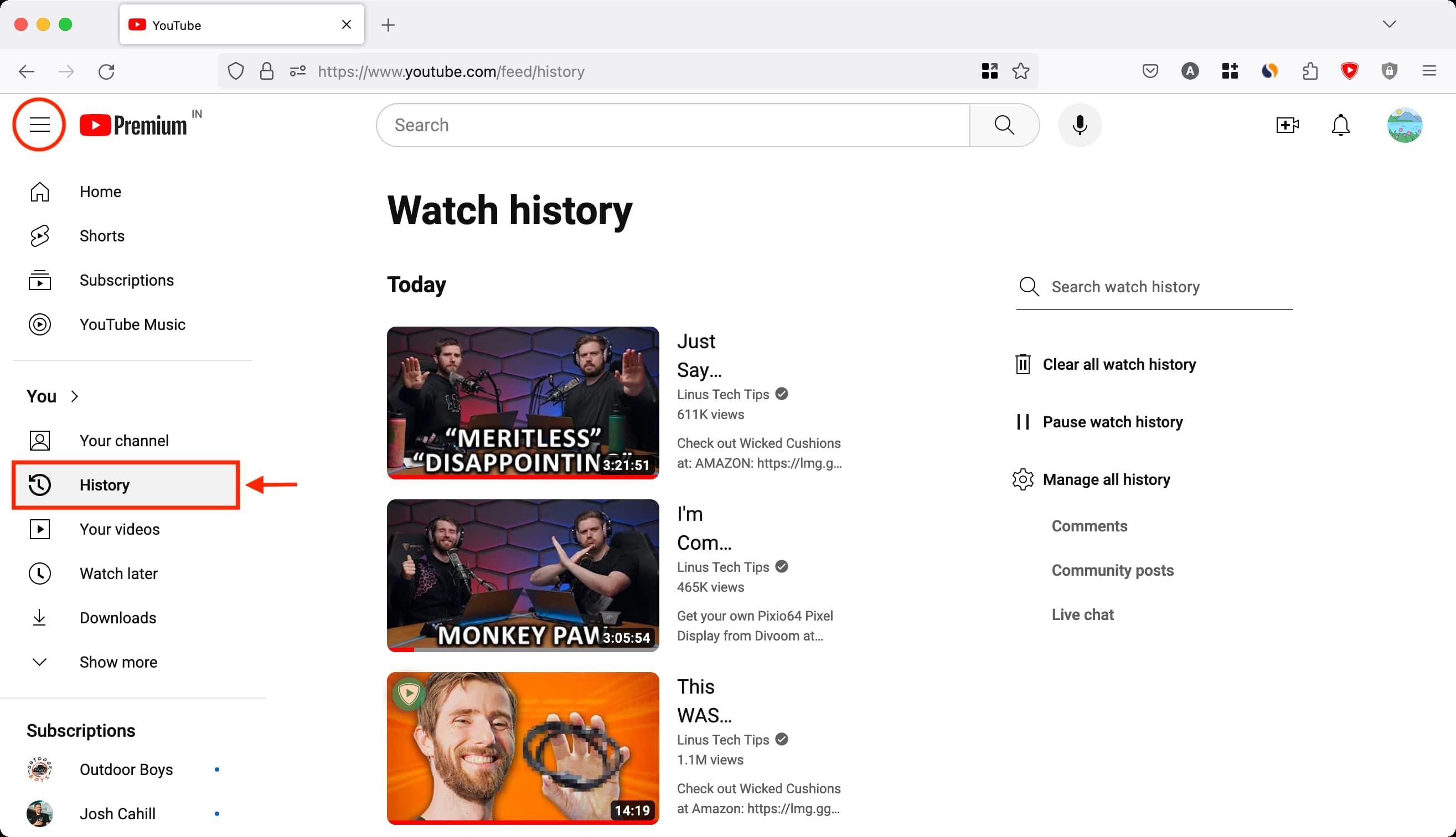
Cleaning up your YouTube search history is like decluttering your digital space—it feels so good once you do it! To start, log into your YouTube account and head over to the left sidebar. There, you’ll notice the menu where you can find History. Click on it, and you’ll see your entire search and watch history. If you’re feeling brave, you can opt for Clear All Watch History, but that’s a big move. Instead, consider doing a little spring cleaning by selecting Manage All History. This will let you sift through your past searches like an archaeologist examining relics.
From that point, you can spot the ones you want to erase. Just click on the little X next to each search entry—it’s almost therapeutic, right? If you’re looking for a quicker solution, don’t forget about the Clear Search History button, which serves as a magical eraser for all those curious click-throughs. Beyond just deleting history, think about adjusting your History Settings so that your searches aren’t saved going forward. That way, you can enjoy your YouTube adventures without leaving a trail behind, like a ghost that passes through walls without a trace.

Mastering Privacy: Adjusting Settings for a Cleaner YouTube Experience
Clearing out your YouTube search history is like decluttering your digital space—it’s refreshing, right? If you’ve ever wondered how to keep your suggestions from turning into a mishmash of odd interests, you’re in luck! Start by navigating to your YouTube account settings. Once you’re there, look for the Privacy section, and you’ll discover the option to manage your search and watch history. With just a few clicks, you can hit that “Clear All Search History” button, and voilà! It’s like hitting the reset button on your digital self, giving you a clean slate to build fresh recommendations.
But don’t stop there! You might want to consider pausing your history entirely. This way, you can enjoy your guilty pleasures without worrying about judgment from algorithmic recommendations. Simply toggle the pause setting, and enjoy your viewing experience without the clutter of past searches lingering like an uninvited guest. It’s all about feeling in control of your digital life. Who wouldn’t want that peace of mind?

Embracing the Fresh Start: Benefits of a Clutter-Free Search History
Think of your search history as a messy garage—it’s easy for clutter to pile up without you even noticing. When you clear out your YouTube search history, you’re not just cleaning up digital debris, you’re welcoming a fresh start in how you consume content. It’s like sweeping away old memories that no longer serve you. A decluttered search history means smoother navigation, making it easier to discover new and exciting content tailored to your current interests. Do you really want to see that tutorial on how to fold a fitted sheet from last year? Probably not!
Moreover, a streamlined search history can enhance your recommendations. You know how sometimes a friend knows exactly what you’re into? That’s what a clean slate can do for your YouTube suggestions! By removing old searches, you’re signaling to the algorithm what you really want to see now. Think of it as tuning your playlist—when it’s filled with outdated tracks, it can drown out the new hits. With a little decluttering, you can unlock a treasure trove of fresh content that truly resonates with your vibes. So, take a moment, wipe the slate clean, and watch as a world of tailored recommendations opens up to you!
The Way Forward
So there you have it! Clearing your YouTube search history isn’t just about tidying up your digital space; it’s like refreshing your mind and reclaiming control over what you watch. Just think of it as spring cleaning for your virtual life—out with the old, in with the new. By regularly clearing that clutter, you get a clearer view of your interests and maybe even discover some hidden gems you hadn’t considered before.
So, why not give your YouTube experience a little makeover? Trust me, it’s liberating! Just a few clicks and you’ll be on your way to a more personalized and enjoyable viewing journey. Go ahead, hit that delete button, and watch as your recommendations transform into a playlist that truly reflects your tastes. Now, go on and enjoy scrolling, knowing you’ve got a clean slate waiting for you. Happy watching!