
Ever found yourself jamming out to your favorite song or binge-watching a thrilling new series on YouTube, only to wonder why it sounds a bit off or pixelated? Let’s be real, sometimes the crispness of that music or the clarity of those visuals can feel like they’re on a rollercoaster ride, dipping and soaring. That’s when you’ll want to check the bitrate of those videos. It’s kind of like tuning into your TV channels; you want the best signal for the best experience, right? In this article, we’re diving into the nitty-gritty of finding bitrate information on your go-to YouTube videos. Don’t worry, it’s simpler than finding your favorite hidden snack in the pantry! Learn the ropes, and you’ll be able to assess the quality of your binge-watching sessions with just a few clicks. So, grab your device, and let’s get into it!
Unpacking Bitrate: What It Means for Your YouTube Experience
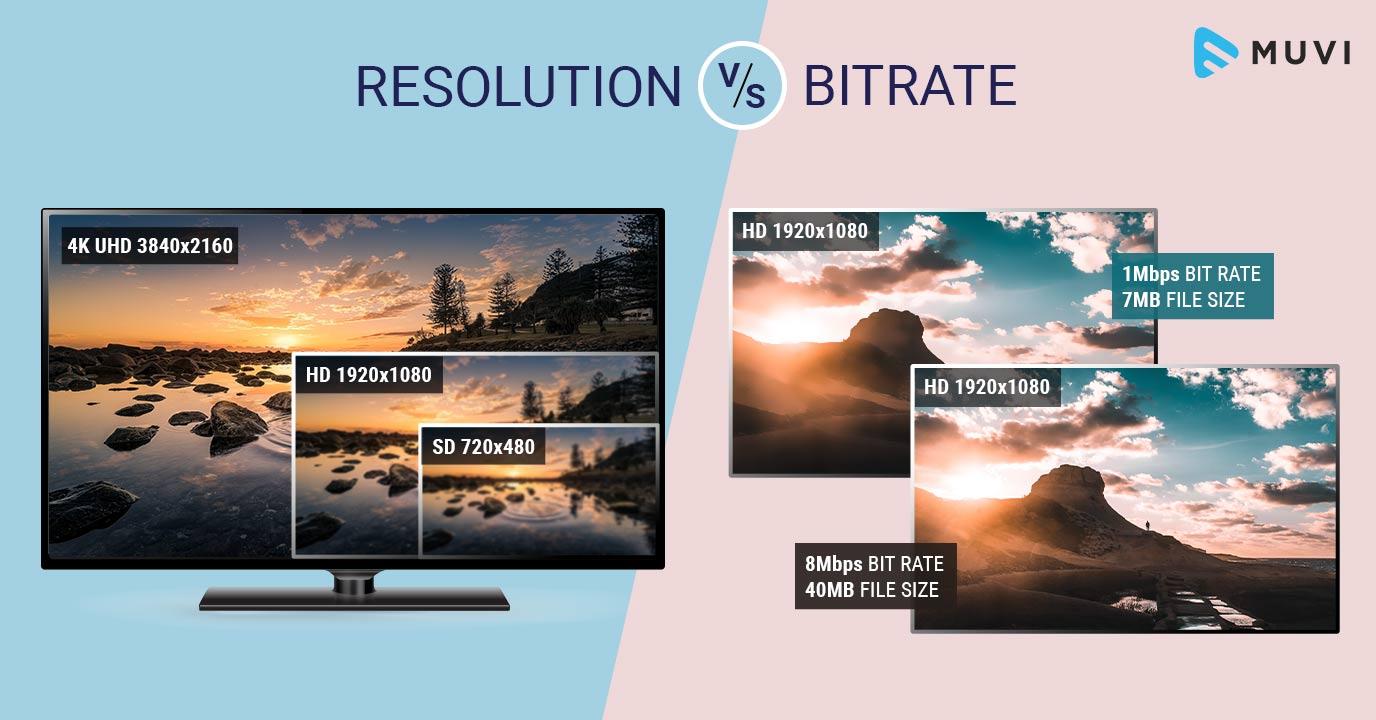
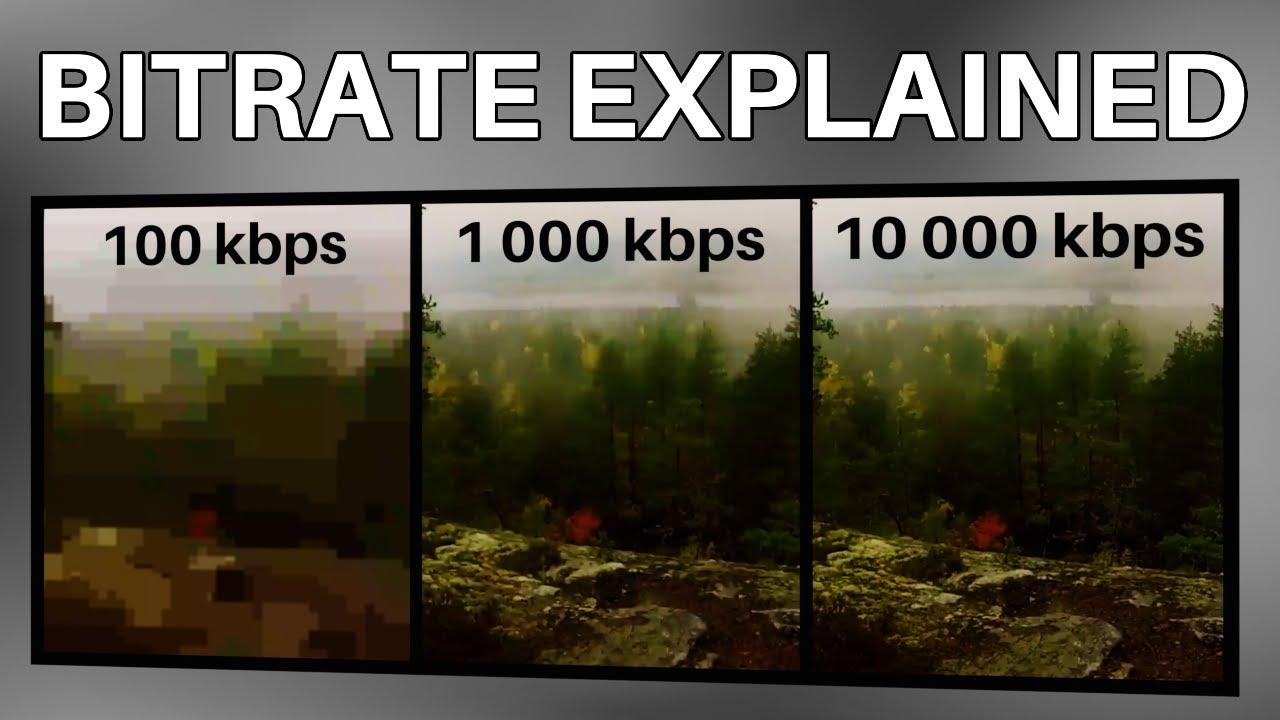
Bitrate is like the unsung hero of your YouTube experience. Ever found yourself watching a video that keeps buffering, or the picture looks less than stellar? That’s where bitrate comes in. Think of it as the amount of data that gets transmitted every second when you’re streaming. The higher the bitrate, the better the quality of the video and audio. Imagine trying to listen to your favorite song on an old, crackly radio versus crystal clear on high-definition speakers; it’s a night-and-day difference. So, when you’re diving into a video, remember that bitrate plays a crucial role in whether you’re gazing at a visual masterpiece or squinting at pixelated chaos.
When checking the bitrate of your favorite YouTube videos, you’re basically ensuring that your viewing experience is as smooth as butter. Here are some quick tips on what to look for:
- Resolution Matters: Videos in 1080p generally have a higher bitrate than those in 720p, so keep that in mind.
- FPS Counts: Higher frames per second (FPS) often enhances the fluidity of the video.
- Content Type: Fast-paced action videos demand higher bitrates compared to slower, more static scenes.
Here’s a quick table for a comparative look:
| Resolution | Typical Bitrate (Mbps) | Recommended Quality |
|---|---|---|
| 480p | 0.5 – 2.0 | Good for Standard Definition |
| 720p | 2.5 – 5.0 | Better Quality, Small Files |
| 1080p | 5.0 – 10.0 | High Definition, Crisp Detail |
Understanding bitrate is key to enjoying your YouTube experience to the fullest, and knowing how to check it can make all the difference.

Tools of the Trade: The Best Software to Check Bitrates Effortlessly
When it comes to checking the bitrate of your favorite YouTube videos, having the right tools in your arsenal can make all the difference. Some standout software options deliver precise readings without the hassle. For instance, VLC Media Player is a go-to favorite. Not only is it free and open-source, but it also houses a plethora of features, including bitrate analysis. Simply load your video, hit Tools, and then Media Information to unveil the hidden data. Another great choice is Bitrate Viewer, which offers a clean interface to inspect the bitrate more visually. It’s as if you’re a detective sifting through clues to uncover the secret sauce behind video quality!
If you’re hunting for something even more specialized, look no further than FFmpeg. This command-line powerhouse might sound intimidating, but once you get the hang of it, you can whip up bitrate information like a pro chef flipping an omelette. And let’s not forget YouTube’s own stats for nerds, which can be accessed with a simple right-click on any video. Don’t underestimate the value of these tools because understanding bitrate isn’t just for tech geeks; it’s essential for anyone who appreciates quality content. Whether you’re a casual viewer or an aspiring creator, having a grasp on bitrate can elevate your video experience!

Step-by-Step Guide to Analyzing YouTube Video Quality
Understanding how to analyze YouTube video quality can feel a bit overwhelming, but with a few simple steps, you can get a solid grip on it. First, check the quality settings of the video. Just click on the gear icon in the bottom right corner while the video is playing. There, you’ll usually see options ranging from 144p to 4K. Lower settings might indicate a less-than-stellar bitrate. Why? Because bitrate is basically how much data is used to store and transmit the video. The higher the bitrate, the better the quality—think of it as the richness in a gourmet meal versus a fast-food burger. You wouldn’t want to settle for the latter, right?
Next, let’s dive deeper into the tools available for checking the actual bitrate. A handy option is using the Stats for Nerds feature that YouTube offers. To access this nifty tool, right-click on the video while it’s playing and select “Stats for nerds.” Here, you’ll find a wealth of information, including the bitrate. Look for the line that reads “Current Bitrate”—that’s your gem! If you’re curious about how this stacks up, here’s a quick comparison:
| Quality Setting | Expected Bitrate (Kbps) |
|---|---|
| 144p | 100-300 |
| 360p | 400-800 |
| 720p | 1500-4000 |
| 1080p | 3000-6000 |
| 4K | 15000-30000 |
So, the next time you’re binge-watching your favorite channel, keep an eye out for these specifics to ensure you’re getting that top-notch viewing experience. After all, nobody wants to watch a music video with all the looks of a pixelated soap opera! Trust your eyes, and let your inner nerd shine!
Maximizing Your Viewing Pleasure: What Bitrate Levels Really Matter
Picture this: you’re cozied up on your couch, popcorn in hand, ready to dive into the latest viral video. But wait—what’s this? The video is buffering more than it’s actually playing. Frustrating, right? This is where bitrate comes into play. In the simplest terms, bitrate is the amount of data processed per second in a video, and it can significantly affect your viewing experience. Higher bitrates can mean clearer, more vibrant visuals, while lower bitrates might leave you squinting at blurry images. Factors like the resolution of the video and your internet connection speed can affect what bitrate is optimal, making it crucial to figure out what works best for your setup.
So, how do you know if you’re getting the most bang for your buck in terms of bitrate? Here’s a handy checklist to help you make sense of it all:
- Resolution Matters: Always consider the video resolution. For instance, a 1080p video typically needs a higher bitrate than a 720p one to look good.
- Stay Connected: A strong internet connection can help you support higher bitrates without buffering interruptions.
- Source Quality: Look for videos uploaded by content creators who prioritize quality over quantity. They usually maintain higher bitrates.
Here’s a quick reference of typical bitrate levels for various definitions:
| Resolution | Recommended Bitrate Range (Mbps) |
|---|---|
| 480p | 1.0 – 2.0 |
| 720p | 2.5 – 5.0 |
| 1080p | 5.0 – 10.0 |
| 4K | 15.0 – 25.0 |
To Conclude
And there you have it—your crash course on checking the bitrate of your favorite YouTube videos! It’s like being the detective in the wild world of streaming, uncovering the hidden details that make your viewing experience truly enjoyable. With just a few clicks and the right tools, you’ll be able to assess the quality of the videos you love, elevating your binge-watching game to a whole new level.
So, next time you’re diving into a content binge, don’t just sit back and enjoy the show—get curious! Explore the numbers behind the pixels and understand what makes the visuals pop and the audio resonate. Who knows? You might even stumble upon some hidden gems with epic bitrates that elevate your favorite clips from good to breathtaking. Remember, whether it’s a heart-thumping trailer or a laid-back vlog, knowing the bitrate can transform your viewing experience.
Now go ahead, take this newfound knowledge, and impress your friends with your insider insights. After all, sharing what you’ve learned is half the fun! Keep those snacks close, the screen bright, and happy watching!